Showing posts with label Flash card. Show all posts

Monday, May 11, 2009

48 Hours on sale, 20% OFF for R4 series. Step on it!

Dear customers,

Your Time is money. Now you get a chance "48 Hours on sale, 20% off on R4 series flashcards", buy R4 series cards on ishopvideogame and instantly Save 20%. All you need to do is using our coupon code "ishop511" when checking out.

R4 series cards are so hot among Nintendo DS Flash card. This special OFFER will end at midnight on May 13th, 2009. So do not hesitate any more, ACTION NOW!

Thanks for always being an ishopvideogame customer.

Frankwang

sales manager

www.ishopvideogame.com


Read more...

Thursday, May 7, 2009

R4i SDHC Landed in Red Box

R4i in Red


R4i SDHC Landed in Red Box

Thing always gets spread fast when it become a hot goods. At very beginning, we had told you something about this new R4i which is put in a red box, but thing alters so it’s time to reevaluate this paradox. GUI is designed as the same as DSTT with rarely little change, fortunately it work quite well.


One day after we checked this card, we received a request from one of our customer asking about where to get the correct kernel. He told us he recently bought an R4i-SDHC with a red package and tried to use it with his DS lite. Looking up the card box it said it works for DS, DSL, and DSi. However, he could’t find the correct firmware to make it work. We went to the official site according to his offer and found that one was under construction. So we googled out another similar site.

All of us were seriously freezed at the first sight. However, the description text was rather cool and fascinating, so we finally have a try. It worked, no big problem or anything uncomfortable. Anyway, we buy flashcard in order to enjoy it, no matter what it really is like real R4 family, revolutionary new technic or something else. The most important thing besides the quality of card itself is to find a really professional seller who has reliable reputation and considerate after service. So there will be no worry or panic about any fault or issue of your flashcard. Contacting with a good partner is more efficient and warranted than taking risk buying goods.

Get R4i at Ishopvideogame
More about R4i SDHC and R4i related coming soon…


Read more...

Tuesday, May 5, 2009

R4i Review

Another R4 for DSi--R4i


People talk about R4i, so we write a review. Although R4i is just a clone of R4 and Ak2i mixture, it do inherite all virtues from both of its predecessors. This is a simple video review and guide in response to the users' requests of R4i. Wish to give you a hand while purchase.

Get R4i From Ishopvideogame

R4i Standard Edition Contents

~ R4i slot-1 card*1
~ MicroSD card reader*1
~ Protect case*1

Notable features

~ Support SDHC card up to 32GB
~ Very simple to use: drag and drop files to the microSD card and play
~ Support Wi-Fi and rumble package and browser expansion
~ Support AR cheat code, DLDI auto-patching

Read more...

Thursday, March 26, 2009

Suppose there is no R4

How is the World Around You without R4DS?


One of our colleague is about to get a DSi when he hear that Nintendo is planing on cracking down on DS flashcard. He hesitates to move ahead since he already had a DS Lite. Some office cuties in our
dept. persuade him to accept the reality and preorder a DSi online or it might be sold out very soon. Sometimes we measure DS as an exclusive portable console for women and the aged, they focus on one or two or some certain kind of game and deeply involve themselves in, that's why they cost lesser on the DS game than youngsters since they can spend long period of time with one game they are in favor. But now, our hero has his head in a tar barrel.
the day without R4

Supposing you wanna buy two megahits this week, but you just have a little pocket money which can only afford a R4DS. Will you get one flashcard with sense of guilt instead of saving money for gamecard? We wonder if there’re any reasons to reject flashcard entirely from a gamer's point of view. What the most of them face is that where to get it.

Perhaps Nintendo detects the risk of flashcard, they start to take action. Promulgate laws, ban online purchase, firmware update on DSi, this century-old Hanafuda shop takes the first step ahead. So if R4DS is perished someday, what will be your first reaction? You might spend countless money on games, in like manner, the game developers do hard on every piece of work they release. Nothing of any value comes easily, people are losing their curiosity and interest while facing so many games which can easily own by using flashcard. All things turn to be pale and valueless because what we eager to get now is extremely within our hands. On the other hand, no one could certainly refuse the temptation of bargain price and universal features, especially the video game. When one's lust of obtaining his favorite game is above and beyond the what he can afford, who will still hold the traditional view of moral constraints?

Read more...

About R4ds.cn

We can't find the site r4ds.cn via google.com


If you are a game player, if you have used R4, you will never forget this supernatural item which come from China, R4 has created a rush of flash cards, so many merchants have became rich, so many gamers fell in love with it. But now, we can't search the site by google, why? Is R4 will be buried? Or it just a kidding?


Nintendo launched their arrowhead DS series for years and it took up over 25% market share in the
world's video game industry, he relied game softwares to eat the big pie. But when flash card thick and fast, the balance was broken. A new power made Nintendo shakes.

Now, we can not search r4ds.cn by google, we can not find the information we want, what happened? What to do? We are confused.
Support justice or the cheating?
Choose genuine or cheap one?

Read more...

Sunday, January 11, 2009

DSi Flashcard Comparison

DSi Flashcards have boosted up their steps after the release of DSi two months ago. Now we can see many well-known DS flashcard teams have annouced their new card for DSi. Though majority of DS users keep low-key at those cards, there are still crowd of people eagering to grasp one. So what's the real status of DSi flashcards? Which one is the best? We are glad to share our point of view with you.

Name Clean ROM Homebrew Cheat State Save Official Price
AK2i

ü

ü

ü

û

198 RMB
DSTTi

ü

ü

ü

û

?
EZ5i

ü

ü

ü

ü

?
R4i

ü

ü

ü

û

?

Your Choice?

AK2i is the first released DSi card. However, there were a lot of problems in the initial shipment. Got frozen on loading screen, black screen with certain games, loose contact, etc. More extraordinary thing takes place on DSTTi, we can not find anything related to this DSi flashcard on DSTT team's official site. So you may wonder how the after service it will be. EZ5i is in the doghouse this time, we use this endearment just because some simple operations may got DSi system halted. And there is a rumor of new R4 team called R4 Pro who develops R4i for DSi. The lie is soon unveiled that R4 Pro is a clone card which uses Ak kernel, that's why we keep away from this R4i.

  The truth of kernel

Please allow us to name those four DSi cards intergradation of DSi card. An anonymous hack team released the secret of DSi flashcard. Look at the DSTTi kernel below, it cheats DSi to run DSTTi as a DS game. So do the rest of DSi flashcards.


Here is the head information of EZ5i, compared to a DS game Tak - the great juju challenge and they are totally the same thing. So now we can explain why you can use the DS kernel on DSi flashcard, all of the DSi flashcards just add a ROM info to bypass DSi's detection system.


The future?

To summarize, all DSi flashcard may fail to run the real DSi game which activates the unique function of DSi like camera or SD card something else. And there are some flashcard teams still keep silent like Super card and GBalpha. Surely the DSi flashcard of the real meaning which supports camera is under developing. Just wait and see.


Read more...

Friday, September 26, 2008

NPlayer Super NDS NDSL player Card

Nplayer Review, by Ishopvideogame
The NPlayer Cartridge is the current top-of-the-line in DS SLOT-1 flash carts. It is just an amazing little device like original DS cart size,it is a complete solution with no need to purchase any additional components or deal with any messy software and truly the easiest mediaenhancer you have ever done; To simply put it, this is a must have peripheral for any regular DS/DS lite owner.
NPlayer Super NDS NDSL player Card


Features:

    Support MicroSD and MicroSDHC card, FAT16 or 32,the biggest supports 32GB.
    About 10 hours working time.
    Supports Clean ROM, drag and drop. Works on any OS.
    Automatically detect save type.
    Save directly to MicroSD card, not to onboard chip
    Supports Moonshell and other homebrew.Open I/O interface
    Supports the WiFi game, DS Rumble Pak, DS Browser
    Supports 4-scale-lightness adjustment( DS Lite only )
    Supports the Soft Reset.
    Supports Action Replay cheat
    Moonshell 1.71 support Software Reset function.
    DLDI auto-patching and full download play support.


Read more...

Tuesday, September 9, 2008

Skills of R4 and DSTT

Run DSTT system under R4 Environment


Do you still bother the compatibility on the latest released DS game of R4? Don’t you ever image to use DSTT kernel with R4 flashcard? One famous game enthusiastic fan Yasu shows us how to overcome this problem with his tool. Let's make our R4 revive!
The main purpose of this tool YS Menu is to make an unofficial customer loader which supports majority of flashcards (The latest version can be used in DSTT and AceKard2). For more information please read the YS Menu manual.

Let’s take DSTT as example.
First, go on his website and download YS Menu.zip and extract.
Run ttextract.exe with DSTT Kernel flies and three files will be created: ttpatch.dat, ttdldi.dat and r4patch.dat
Then rename YSmenu.nds to default.nds, copy r4patch.dat, default.nds, YSMenu.ini and TTMenu folder to TF card directly to replace the official ones. The YS Menu will run automatically when turn on DS.
If you don’t want to boot DS with YSMenu, just put default.nds, r4patch.dat, default.sav and YSMenu.ini to another folder.


Read more...

Friday, September 5, 2008

Descendant of R4

New Generation of R4 -- R4 SDHC

It's little bit surprise that here comes the second generation of R4, one of the most popular NDS flashcard. From R4 Team official site we got its name: R4 SDHC. According to the data we get, let’s check it out what R4 SDHC it bring us.

R4 SDHC
R4 SDHC

Section I -- What is SDHC?
The table shows the development of SD memory card criterion. SD Card Association established new SD Memory Card Specifications 2.0 on May, 2006 since the urgent demand of video technology and real time R/W speed, which SDHC belongs to.
The revolution upgrades the R/W speed as well as supports the larger capacity. It’s a big contribution of R4 SDHC to support huge-sized DS game and multi-function software in the future.

Criterion Version Class R/W Speed Max Capacity Support
SD 1.1 Class 1 1M/s 4G
SD 2.0 Class 2 2M/s 8G
SD 2.0 Class 4 4M/s 16G
SD 2.0 Class 6 6M/s 32G

Section II -- New Function
There’re two new functions mentioned in the official guide: DLDI auto-patching and Full download play support.

Section III -- Package & appearance
There is no more different but a big “new” brand on the right corner and white “SDHC” printed after R4 logo. We can also see SDHC support description at the back cover. The inner side still sets the same style as R4 does, one card box and a USB2.0 card reader. Add SDHC logo at the front of the card.
The card is re-designed without spring slot so players don’t afraid that their card may get stuck. One more to mention, R4 SDHC has no shell to protect its gold fingers. And it can be inserted and pushed out of the DS with ease since it is thinner than other flashcards.
It’s a little pity there is no change for the R4 SDHC interface except auto-changing skin by month. Also all cheat codes on R4 are compatible.

Section IV -- The Kernel
R4 SDHC kernel is incompatible with R4’s (It’s important since it distinguishes the real R4 and other forms of R4 flashcard), the latest version is 1.21, you can download it from the official site (http://www.r4sdhc.com/) and copy it to your card to replace the original one.

Section V -- Games & software
Report from some Chinese DS BBS shows that R4 SDHC can run most DS games and majority of software without accident. It also shows perfect representation to Emulators on DS.

Software
ImgView 1.1 -- Pass
Comic Book DS 3.0 -- Pass
M3Sakura -- Pass
nesDS -- Pass
snesDS -- Pass
neoDS 0.2 -- Lag on Metal Slug

Games
Super Mario 64 DS -- Pass
Summon Night 2 -- Pass
Final Fantasy 12 -- Pass
Castlevania ROP -- Pass
Sigma Harmony -- Pass
Band Brothers DX -- Pass

Summary
Since the multimedia player function is widely used with emphasis. R4 SDHC updates its CPU to supports 32G TF at max. More, it can be know from those fake R4 by the new design of PCB and kernel. Although it is no more than a new version of R4, still we can look ahead a bright future on this classic flashcard.
There are 2 other pictures of the r4 sdhc, have a look!

R4 SDHC
R4 SDHC

Read more...

Monday, August 18, 2008

R4-III, Upgraded Revolution!!!

2nd generation storage device, R4-III SDHC


R4 has created a new flash card world, DSTT has blowed a wind. This time a upgraded R4-III SDHC appear our sight, compare with other flash cards, it has solved the problem of hard connecting; with lower power consumption, support SDHC; multi-language and Perfect compatibility makes R4-III stand out. Simply to use, this is a must have peripheral for any regular DS/DS lite owner.(Notice: This product is not made by R4 team.)
Sneak Previews!
R4-III upgrade revolution for DS

If you want to know more about it, please check R4-III SDHC


Read more...

Friday, August 1, 2008

Guide to using M3

9 seps to use M3


Guide to using M3
1.Know that if you order this product by mail, it is likely that you did not receive an installation CD, which is very useful. This guide is mainly for those who do not have this CD.
2.Gather all of the components. There should be a card reader with a USB key on the end. Put the Micro SD card in the reader. Be careful not to break it! Turn on your computer, then stick the card reader containing the card into the USB port.
3.Notice the menu that appears. Scroll down to find the button that reads "Open to View Files." The details of the Micro SD card will be displayed. Use the "Up One Level" button in the window. This should take you to "My Computer."
4.Discover that there is something called an e:// drive that is not normally there. Rename this "M3 REAL" and go back into it. Create a folder called NDS (save this for later).
5.Search Google for "M3 real system files", and find a website that gives system files 3.0 or above. (Note: On the actual M3 website the system files are wrong!)
6.Download the system files and save them to the M3 Real card, but be sure not to save them in the NDS folder. Then, use an extraction program to unzip the files.
If you can't do that, don't worry! Go into the zipped folder and copy all of the files and folders. Create a standard folder called "system2" and put them in there. Then, go back, delete the zipped folder, and rename the folder from "system2" to "System". Be sure to get this right, or it will not work!
7.Notice that the box it says "Built in PDA", but you will find it is not. Go back to the web and find M3 Real PDA files and save them to the M3 Real card. Then unzip or copy and paste the files into a standard folder. The M3 Real cannot read zipped folders.
8.Return to the NDS folder and create sub-folders (such as MUSIC, PICTURES, etc.). Place your files (e.g., MP3s) into the corresponding folder.
9.Go back and try again if it didn't work.


Read more...

Wednesday, July 30, 2008

Guide to using R4 DS

6 Steps to use R4


The R4 DS is revolutionizing the gaming world, for it enables you to load a lot of games to your DS. You will need a micro SD card which is not included. But everything else you need to get gaming is already at your fingertips.

r4

1. Gather your supplies. If your computer does not have a slot for the micro SD card, use the USB adapter that comes with the R4.

2. Slip the micro SD card into the USB adapter that comes with the R4 and then insert the USB adapter into a USB port in your computer. Go to "My Computer" and click on "Removable Disc" for the drive that corresponds with the USB adapter. This will vary with each computer.

3. Remove the disc that comes with the R4 and load it into your computer. Copy the files from the disc onto the micro SD card.

4. Take the micro SD card from the USB adapter when all the transferral of files is complete. Slip it into the bottom of the R4.

5.
Insert the R4 into the DS. Turn the DS on. If you used the R4 properly, the DS should go to the R4 screen.

6. Use the R4 DS to download games for your DS. You can create files on your computer which can then be loaded to the DS via the micro SD card or the R4.

Things You’ll Need:
Computer
R4
Micro SD card


Read more...

Monday, July 28, 2008

Guide to using DSTT

8 Steps to use DSTT


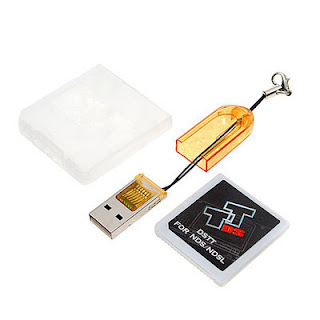
As with all of the new generation of Nintendo DS Flash Cartridges, it is very simple to use.
To play your downloaded backup games, there are only a few steps.
1. Insert your Micro sd card (not supplied unless stated) into the usb card reader (supplied).
2. Insert the usb reader into the usb port on your PC. (not supplied!)
3. Download the DSTT Menu software here.
4. Unzip the file and place the file TTMENU.DAT and the directory TTMENU onto the root of the micro sd card.
5. Unzip any games you wish to play and put them onto the root of the micro sd as well.
6. Take the micro sd from the reader and insert it into the flash cartridge (supplied).
7. Insert the flash cartridge into your DS.
8. Turn it on. Pick a game from the DSTT menu. You can use the touch screen or just press A to play.

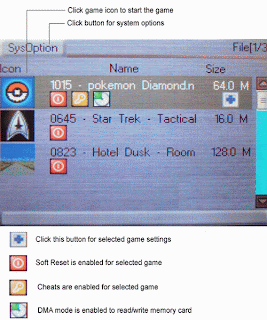
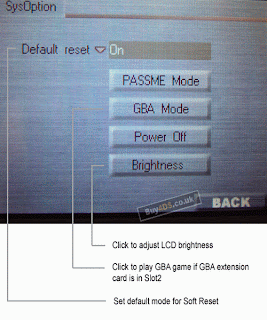
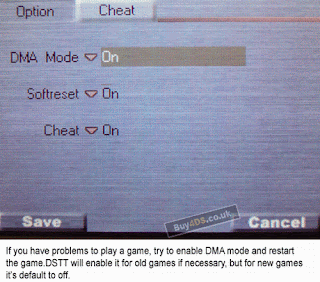
There are some images, you can see from these images, the different Menu options.
Below is a guide to their meanings.


Read more...

Sunday, July 27, 2008

Flash Cards——DSTT vs M3 vs R4 comparison

A comparison of flash card, R4, M3, DSTT


When we use the amazing R4 and M3 product, which enables playing of movies, music, and backup games on the NDS, another model called DSTT come out. There is a list after test the product and compare functionality between the 3 models:

comparison of flash card, R4, M3, DSTT

Which is the best to buy out of R4, M3 or DSTT? I know the DSTT is newer and faster, but why is it cheaper than R4?
Read more...

Monday, July 21, 2008

Hardwork of best Flash cards for Video games

The most popular flash cards in the market


1.R4
The R4DS Cartridge is the current top-of-the-line in DS SLOT-1 flash carts. It is just an amazing little device like original DS cart size, it is a complete solution with no need to purchase any additional components or deal with any messy software and truly the easiest media enhancer you have ever done; To simply put it, this is a must have peripheral for any regular DS/DS lite owner.
R4

2.M3
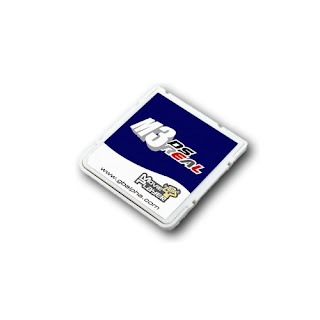
The M3 DS Real is a Slot 1 all-in-one backup unit for the Nintendo DS and DS Lite. The M3 DS Real does not require any additional Passcard or Passme devices to operate. Simply copy your ROMs or multimedia files onto a low cost, high capacity MicroSD card, insert the card into the the M3 DS Real and now insert the M3 DS Simply into your DS or DS Lite and enjoy!
M3

You can play MP3's, read TXT books, and run your homebrew applications with ease. The M3 team has made functionality their number one priority with this new generation of DS development. This simply is the best product currently available for the Nintendo DS.
The M3 DS Real supports MicroSD HC media which will allow massive storage capacity.

3.DSTT
These flash cards designed for NDS slot interfaces let users drag and drop files directly from their PCs to their DS consoles. They support TF cards up to 4TB in size without any lag and are compatible with any operating system. Each unit automatically detects and generates game save type, making a completely user-friendly experience for your customers.
DSTT

4.Super card
As the first extra flash memory game cartridge, SuperCard team has been working in developing new features in the past three years. With the simple but practical functions, SuperCard has gained a great popularity of gamer in the world. After a long period of development, our team finally come up the new version -- SUPERCARD DS(ONE), which is the best Slot 1 solution.
super card

NO PASSME, NO FLASHME and NO CONVERT. Support Clean ROM mode, Patch Mode and Super Mode. Clean ROM Mode support all clean rom, player do not worry about any new ROM in the future. Patch Mode support RESET, Realtime Cheat Code, Realtime Game Guide, save to flash card directly without any save lost. Super Mode support FAT/FAT32 unlimitation storage space. Support SC Rumble Series as a rumble package. Support SC CF/SD/Lite GBA union with save function. Built-in Moonshell support. Player can run txt, MP3, Ogg, DPG2 DSG0/DPG1 from menu directly. It's a real multimeida entertainment system.

5.EZ-falsh V
EZ Flash V provides 100% ROM compatibility for DS play, with no patching required - just drag and drop the game into the EZ Flash card, and you are ready to go. It also has onboard options to increase ROM compatibility, and works with homebrew applications.
EZ-falsh V
Read more...
Visits To My Blog
hit statistics