Showing posts with label Nintendo Wii. Show all posts

Wednesday, January 14, 2009

For Dance or Training?

Wii Family trainer mat and Wii dance mat


Wii Family trainer mat and Wii dance mat
mat, For Dance or Training?


When we see them in the internet or put them together and you know both of them are special degsign for Wii, how you think of them, maybe you think they are 2 kind of dance mat for Wii. I am sorry to tell you they are different, the Wii family trainer mat is like the Wii fit balance board and gamer can use it to play saveral games, but the Wii dance mat is special design for Wii dance games, and the appearance is more suitable for dance games.
Let's see some images of them first:

Wii Family trainer mat and Wii dance mat

Wii Family trainer mat
Wii dance mat
Wii Family trainer mat

We can tell them apart easily from these pictures, to see more Please check Wii family train.

Here is some knowledge of them, hope them to be helpful!

The Wii dance mat and Wii dance mat game also have lots of other features. There are customisable routines – so you can dance to your own tune and push yourself even when you’ve managed to master the 50+ songs included. A battle mode lets you place obstacles for your partner if dancing with one or more other players.

For the original Wii family trainer mat pack, Just like in the arcades. Bring a new and funky dimension to game control - with your feet. The ultimate dancing simulation. the game includes the specially designed Family Trainer mat controller which, when combined with the Wii Remote, lets players get totally physical in a series of crazed challenges. Unlike other games for the Wii which only focus on the arms, Family Trainer gets the feet involved too for total body gameplay. Simple controls and intuitive play make the game easy to just pick up and play, and let players of any age get involved, get physical and have maximum fun.

These 2 mats are sell in gameyeeeah's online shop,gameyeeeah and ishopvideogame
check the link to see them on sale

Read more...

Wednesday, December 24, 2008

Fashion Combination Gift for Christmas_4

Gameyeeeah's gift for Christmas---Entertainment pack of Wii


Gameyeeeah's gift for Christmas---Entertainment pack of Wii

Buying a game console accessory is equally important as buying a game console. It is because these console accessories have to be used for enjoying the full excitement of the games. gameyeeeah have considered this problem and this time we will bring you a entertainment pack for Wii games.

These elements have to be used by Nintendo Wii players while they play games like guitar hero, karaoke and Wii music. This is not a pack of just accessories but a pack of great fun, you can use them to gain more recreation like music and dance. We also put a 2800mAh high capacity rechargeable battery pack in the pack, you can having fun without worrying about the electric energy of your controller. This gaming accessory is a suitable pack for playing Wii games which brings reality while you play. Get full enjoyment of Nintendo Wii games by using this Wii entertainment pack.
These are some images of the items, you can also check the link to see them sell in gameyeeeah.
Dance Mat for Wii


Maraca Grip for Nintendo Wii Samba de Amigo

PEGA Wireless Karaoke Microphone for Wii


PEGA Wireless Guitar for Wii


New PEGA Dual Charging Station with 2800mAh Battery for Wii Remotes


Read more...

Friday, December 5, 2008

Wii Music Wiimote Instruments from ezGear

Wii music pack

Wii Music is a great game, so is its wiimote instrument. Now ezGear releases their Wii Music Pack consists of a plastic saxophone, violin and a pair of drumsticks which allows you fit into the game. Well, we mean that it is a pretty cool thing to enjoy yourself. And as gift of Xmas, it will bring cheerful chatting and laughing to your family.

Read more...

Fashion Combination Gift for Christmas_2

Gameyeeeah's gift for Christmas---Value pack of Wii


Buying the right gaming accessories for a game console is an important thing as the gaming accessories determine the gaming features and functionalities. If you buy inappropriate accessory, it is impossible to have a mind blowing game. Wii sports pack is one of the console accessories which are dedicatedly made for Nintendo Wii game consoles. Wii sports pack supports the gamer to play interestingly Nintendo Wii games.
Gameyeeeah's gift for Christmas---Value pack of Wii


This Wii sport pack consists of Racing Grip, Golf Grip and Maraca Grip which offers qualitative performance. It is easy to connect with the consoles and it stays firmly as well. All through the gaming process you will not have to face loose contacts. In case of the safety aspect this unit is very safe to use and very durable which offers long term usage. This one is ideal for all kinds of Wii sports games and adds to the fun of the overall gaming. Though the attachments may seem very small and tiny in appearances it performs well enough.
Another important device, high capacity battery pack is also included, it will extend playing time maximum, how about them with this special price, have a look...

3600mAh Battery Pack for Wii Remote Controller

Retractable Golf Club for Wii

Maraca Grip for Nintendo Wii Samba de Amigo

Racing Game White Steering Wheel For Wii Controller


Read more...

Monday, October 20, 2008

New Product in Gameyeeeah!

Replacement Customize Console Case for Wii


Replacement Customize Console Case for Wii

This is a replacement custom case special design for your Wii console, 9 kinds of colors to choose. If you want a unique console by yourself, this case is your best choice. The case is the same size as the original one, you can choose the one you like, low price, easy to install and remove, perfectly fit your console stand.


Features:
1. Multicolor to choose.
2. Same size as the original one.
3. Easy to install and remove.
4. Perfectly fit your console stand.
5. 1 X Wii Custom Console Case.

Replacement Customize Console Case for Wii

Check Replacement Customize Console Case for Wii to buy it in gameyeeeah.com

Read more...

Tuesday, October 14, 2008

Dance! Dance!

Dance Mat for Wii


Dance Mat for Wii

Have you played dance games or enjoyed a happy weekend with the Wii console? Have you ever use the dance mat to train your dance for the coming weekend's party? You want to dance with her, you want to hear her tell you that you dance so well you want to be the center of the party. May be it is only a dream in your mind, (smile)don't worry about that, I will tell you how to do...
Dance is a pleasure need you take your heart and soul but it might take a lot od time to get ready for it, you need to choose a pair of pretty shoes, nice clothes and many other things to do.
Sometimes it is a inconvenient thing to get ready, you want an easy life. My suggestion is you can buy a game console, not to play games just dance, sounds interesting? I am not willing to tell you buy anything but you can learn to get a better life.

Other:
I will show you our Dance mat for Wii sell in gameyeeeah.com
Dance Mat for Wii
Dance Mat for Wii

Wii Dance Mat is the perfect companion for Dance Dance Revolution Hottest Party for Wii games. Bust a move on this slip resistant dance mat and enjoy arcade style realism in the comfort of your home. Not only will you improve your dancing skills but stay fit while playing your Wii dance games. Dance mat controller for Nintendo Wii / Game Cube Compatible with Nintendo Wii dancing games Non-slip, heavy duty plastic covering Hard wearing pressure pads Lightweight and Foldable design for easy storage.

Platform: Nintendo Wii
Features:
* Dancing Mat for Wii
* Bop Skip, Tap and Do a Number of Dances on the Dance Mat
* 4 Directional Touch Pads Guide You to Mimic the Instructed Moves
* Made of a Colorful Soft, Plastic Material
* 1.86 Lbs (WxLxH) 31.4" x 0.15" x 36.14"


Read more...

Wednesday, September 24, 2008

Color Your Wii Remote

Handle Padlock Strap and Battery Cover Kit for Wii


This time I will show you a replacement for Wii remote, contains a wrist strap and battery cover. After show you the features of the kit, I will show you some pictures of the item, a bit cute and useful, because it is sold in a low price $2.5. Let have a look at its features first.

Features:
1. This Handle Strap Battery Cover Kit has a clever design for it is a skidproof battery cover.

2. Our Hand Strap Battery Cover Kit for Wii is not only pleasing to your eyes and to keep your Battery from missing.
3. Our Battery Cover Kit can bring convenience to you because of its portable design.
4. Battery Cover Kit can keep people from radiation.
5. Materials: hard plastic and nylon.
6. Colour: Pink and blue.
7. Dimension: 8.6x2x3.5cm
8. Weight: 57g
Handle Padlock Strap and Battery Cover Kit for Wii

If can also chek Handle Padlock Strap and Battery Cover Kit for Wii to see it on sale in http://www.gameyeeeah.com/

Read more...

Tuesday, September 16, 2008

Protect Your Wii Balance board!

Protective soft skin for Wii balance board


Overview: Keep your Wii Balance Board clean while improving your grip and even adding style with Talismoon protective soft skin. Available in several colors, it is the perfect companion to your balance board.
Protective soft skin for Wii balance board


Quality/Usability: When there is an accessory such as the Balance Board, accessories for it is not far behind. When the Wii was first released, there were reports of peoples TVs being smashed by the Wiimote either by flying out of peoples hands or the wrist strap broke. To prevent and to protect your Wii Balance Board, Talismoon has released a rubber silicone skin.
Protective soft skin for Wii balance board

As mentioned above, the protective soft skin is made of silicone rubber. Not only is it durable but it is also washable. The Protective Skin is like any other silicone skin on the market whether it be for your gaming controllers, handheld systems or cellphones. Simply slide it over your device and that is it. The skin covers the entire top of the balance board and wraps it self to the bottom of the board.
Protective soft skin for Wii balance board

The skin gives you easy access to the button on the balance board as well as battery pack. On the top of the skin, there are two footprints. These are outlined in rubber dimples. This gives you traction and grip when using the Balance Board.

Conclusion: Overall, the Wii Balance Board Protective Skin is a nice product. Nothing special about it. Its like a normal rubber silicone skin. You can choose from different colors: pink, green, blue, purple, grey. Although the dimples on the top gives you grip, is soft and where to place your feet, it may not work well for those with sensitive feet or just dont like anything touching their feet.

Please check Protective soft skin for Wii balance board on sale

Read more...

Thursday, August 7, 2008

Replacement wii wrist strip

Change a new replacement wii wrist strip for your wii remote
These imformation comes from Nintendo website
They said
Wii Remote Wrist Strap Replacement Request Form


NOTE: The following wrist strap replacement information applies to certain Wii video game systems and individually sold Wii Remotes purchased before December 31st, 2006.

Nintendo is offering to replace the original version of the wrist straps for the Wii Remote with a newer version. Because Wii consoles shipped starting in early December, 2006, already utilized the newer version of the strap, you will need to determine which version of the strap you have before ordering a replacement. To view the difference between the original and the new version of the strap, please click here.

If you have an original version of the strap, please complete the form below to get a replacement.
If you have a newer version of the strap, but would like to purchase a replacement, please visit Nintendo’s Online Store to place an order.

Please note, it may take a few days for your order to be processed. Once your replacement wrist strap has shipped, you will receive a confirmation email from Nintendo. After that point, it may still take another 5 to 9 days for delivery depending on your location. Please do not contact Nintendo regarding your replacement wrist strap until after that time period has passed.

For the new strap will gives you a more safe protection when playing, if you have ignoren this imformation, plaease change it as soon as possible.
Read more...

Tuesday, August 5, 2008

Guide to synchronize a Wii remote

Synchronize a Wii Remote


The Nintendo Wii is very fun to play, but it's more fun when you play with two or more players. You will have to synchronize additional remotes. Here is how you do it.


Things You’ll Need:
Wii console
Wii remote(s)

Follow these steps.
1 .Make sure your Wii is turned ON.
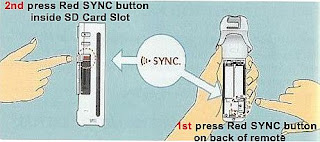
2. 1st - Remove the battery cover (on back of remote) of the Wii you want to synchronize. PRESS and RELEASE the red SYNC button (as illustrated). The Player LEDs (blue light in front on remote) should blink.
3. 2nd - Open the SD Card Slot, which is located in the front of your Wii console. PRESS and RELEASE the red SYNC button located inside the compartment.
4. As soon as the Player LED blue lights stops blinking then the connection is complete. The connection should not take very long.
Read more...

Sunday, August 3, 2008

Play the Nintendo Wii Safely

Safety Information for Playing Wii


There is a lot of press running around about how unsafe the Wii is. Black eyes, broken televisions, windows, light fixtures and a whole list of other things have been damaged by overzealous Wii gaming. The good news is that a little forethought and preparation can go a long way toward preventing Wii-related damage and injury.

Play the Nintendo Wii Safely

Play the Nintendo Wii Safely

1. Clear your area. Before you start playing, make sure your play zone is clear of ANY obstacles: people, hanging light fixtures, furniture, pets and anything else that might get in the way. Create at least a five-foot circle around you to ensure that nothing gets damaged.

2. Watch the commercial for a good example of how much movement is needed. It doesn't take very much for the Wii controller to register movement. Use light, easy movements and the players will do what you want them to do. If you need to see what this looks like, watch a Nintendo Wii commercial. All of them show proper Wii gameplay.

3. Get a new strap if you got a Wii before early December 2006. It has been largely publicized that the wrist strap that came with early-model Wii consoles is too small to hold the controller and can break. If you purchased a Wii before December 2006, fill out Nintendo's online Wrist Strap Replacement Request Form (see Resources below) for a free replacement strap. If you bought a Wii after early December 2006, your Wii should already come equipped with the new strap.

4. Use the wrist. It's all in the wrist, not in the shoulders. Use light, slow movements. This cannot be overemphasized! Fast, violent movements are not only unnecessary, they are dangerous.

5. Take it easy! Relax, and have fun. If you find yourself getting frustrated or angry, simply put the game on pause or turn it off, walk away and come back later when you've cooled down.

6. Take a break! The Wii itself will even say “Why don’t you take a break?” and show you a picture of an open window and the outdoors every now and again. It's good advice: Take a break! Go outside, run around! Yes, the Wii is a physically active video game, but take your eyes off the television for a while and move around in the great outdoors. It’ll do you good.

7. Try and remain aware of your surroundings. Take a quick second when the game is loading and look around you for anything or anyone that might have moved into your play circle without you noticing. It is easy to get sucked into the games and become oblivious of the world around you, but doing so can blind you to something or someone about to stumble into the path of your hand and the Wii controller.

Don't forget safety when playing games!


Read more...

Thursday, July 31, 2008

Wii MotionPlus, the expansion device of wii remote

Wii MotionPlus, Nintendo's upcoming accessory for the revolutionary Wii Remote


Wii MotionPlus

Nintendo's upcoming Wii MotionPlus accessory for the revolutionary Wii Remote controller again redefines game control, by more quickly and accurately reflecting motions in a 3-D space. The Wii MotionPlus accessory attaches to the end of the Wii Remote and, combined with the accelerometer and the sensor bar, allows for more comprehensive tracking of a player’s arm position and orientation, providing players with an unmatched level of precision and immersion. Every slight movement players make with their wrist or arm is rendered identically in real time on the screen, providing a true 1:1 response in their game play. The Wii MotionPlus accessory reconfirms Nintendo’s commitment to making games intuitive and accessible for everyone. Nintendo will reveal more details about the Wii MotionPlus accessory and other topics Tuesday morning at its E3 media briefing.

Advantage:
1.The motionplus will gives you a more accurate positioning when playing.
2.Making games intuitive and accessible.
3.Gives you a new feeling when paying.

Disadvantage:
Add extra weight to the wii remote.
Extending the wii remote.
When using the motionplus, we can't use the jacket to protect your wii remote.

What do you think? How to solve the problem?


Read more...

Tuesday, July 29, 2008

The way to protect a Wii remote

Protect Wii remote


Certain hazards come with playing tennis, bowling and baseball in your living room. Unfortunately, some people have learned this the hard way through an accidentally-thrown Wii remote. Considering the value of a Nintendo Wii and the value of other things around your living room, such as your television, you may want to take some steps to protect your Wii remote and your living room!
protect Wii remote

1. Use the Wii remote wrist strap. Secure the strap tightly around your wrist before you play and check it routinely to make sure it has not loosened. This is not a perfect solution, as even with the strap the Wii remote could detach. However, it is the quickest, cheapest and easiest--a necessary first step.

2. Check to see if you need a new strap for your Wii remote. Nintendo is offering to replace straps on some Wii remotes with sturdier straps. To see if you need a sturdier strap, go to Nintendo's website and click on "Important Safety Information for Playing Wii."

3. Reinforce the strap with some fishing line. Place one end of the fishing line through the Wii remote where the strap connects and the other through the strap itself. Then, bring the ends together and tie a solid knot. This will ensure the Wii remote strap does not become separated from the Wii remote.

4. Get an invisible Wii remote shield. The invisible shield is a film that covers your Wii remote and protects it from scratches and dings.

5. Choose a colorful Wii remote silicon case for a more stylish look. These silicon cases fit over your remote with holes for the buttons. They will also protect your remote from dings and scratches and come in a variety of colors. Search Amazon for "Wii remote silicon case."


Read more...

Sunday, July 20, 2008

Do you know Nintendo Wii Zapper?

Knowledge about Wii Zapper


  • What is the Wii Zapper?

  • The Wii Zapper unites your Wii Remote and Nunchuk (each sold separately) and brings you an experience like no other. Steer your character’s movement using the Control Stick on your Nunchuk as you zap your way to victory with your Wii Remote.


    And since every Zapper comes bundled with Link’s Crossbow Training, you’ll be a zapping pro within minutes of opening the box!

  • How does Wii Zapper work?

  • Look at this picture:


  • How to use Wii Zapper?

  • go something like this:

    Attach Wii remote.
    Aim.
    Pull trigger.
    Remark: this article is from nintendo


    Read more...

    Thursday, July 17, 2008

    9 most popular Nintendo Wii accessories

    Wii Accessories Buying Guide


    Nintendo's Wii screams out for accessories with its open-ended design and diminutive size. The Wifi capabilities are ideal for novel accessories that make your gaming that much more fun. As the months roll by, Nintendo and outside developers should fill up the shelves with creative ideas on how to get the most out of your cute little motion sensor-equipped machine. Here is a look at what's on the market for now.
    Wii Accessories Buying Guide

    1.Wii Memory SD :
    The Wii comes with 512mb of memory for your game saves, pictures, and messages, but you can nearly triple your space with the purchase of one of these SD flash memory cards, which are the exact same memory devices you use in your digital camera. They are interchangeable! Plus that memory is getting cheaper, go for a 2GB SD Card at least, or higher with a 4GB SD Memory Card or even 8GB!

    2.Wii Component Cable :
    For those with a HiDef TV, component cables are a must. Replacing the A/V cables that come in the console box, these high-definition cables lift your resolution to 480p, the lowest visual standard of HDTV. If you don't already have an HD TV, make sure you look into it.

    3.Wii Remote :
    Your Wii box came with a controller, but you're missing out on the party-riffic capabilities of your machine unless you at least by one extra controller. Heed this advice: buy three. Nothing screams fun like "Wii Sports" tennis doubles, with four players swinging their Wii-motes like maniacs.

    4.Wii Steering Wheel :
    Transforming your Wii remote into a wireless steering wheel, this snap-on accessory amps up the feel of racing titles such as "Excite Truck". Too bad it's not equipped with a horn or wiper fluid.

    5.Wii Wi-Fi Adapter :
    It's nice and all that the Wii is Wi-Fi compatible out of the box, but that feature won't help you if you don't have a wireless router. Luckily Nintendo's adapter comes to the rescue. Plug it into your computer's USB port, install the software and your can now exchange messages with the rest of the world's ultra-Nintendo geeks.

    6.Wii Storage and Protection Kit :
    If you're the overprotective type, you may want to spring for this kit, which wraps every square inch of your console and its add-ons in hard plastic. The set tricks out your Wii and saves you money by combining various knick-knacks into a single package.

    7.Wii Console Stand :
    The Wii is pretty stable, but just to be sure it won't tip over, you might as well slip it into this kiosk, which also has space for controllers. The setup may cancel out the benefits of the Wii's slenderness, but at least it consolidates your stuff into one spot.

    8.Wii Nunchuk :
    Less necessary than the Wii Remote, the Nunchuk plugs into your controller and allows for precise control for some of the Wii's more complicated titles. You'll need at least one of these, along with an extra Wii Remote, if you want to KO your friends in "Wii Sports" boxing.

    9.Wii Classic Controller :
    You'll only need this baby if you've downloaded an older game that isn't compatible with the Wii Remote. It snaps into your remote like a Nunchuk and brings back the feel of the old Super Nintendo and N64 controllers.
    Read more...

    Friday, July 11, 2008

    How does the light gun for a video game work?

    Lots of home video games and arcade games use some sort of gun as an input device. You point the gun at the screen and pull the trigger, and if you hit the target on the screen, the target explodes.
    Wii Remote Controller Light Gun in gameyeeeah
    To create this effect, the gun contains a photodiode (or a phototransistor) in the barrel. The photodiode is able to sense light coming from the screen. The gun also contains a trigger switch. The output of the photodiode and the switch are fed to the computer controlling the game.

    At the same time, the computer is getting signals from the screen driver electronics. If you have read How Television Works, you know about the horizontal retrace and vertical retrace signals used to align the picture on the screen. The screen driver electronics send pulses to the computer at the start of the horizontal and vertical retrace signals, so the computer knows where on the screen the electron beam is located during each frame.
    Wii Combined Light Gun in gameyeeeah
    The computer normally uses one of two different techniques to figure out whether or not the gun is pointed at the target when the user pulls the trigger:

  • The computer blanks the screen and then paints just the target object white. If the photodiode senses darkness after one vertical retrace signal and then light after the next, the computer assumes that the gun is pointed at the target and scores a hit.

  • The computer blanks the screen and then paints the entire screen white. It takes time for the electron beam to trace the entire screen while painting it white. By comparing the signal coming from the photodiode with the horizontal and vertical retrace signals, the computer can detect where the electron beam is on the screen when the photodiode first senses its light. The computer counts the number of microseconds that pass between the time the horizontal and vertical retrace signals start and the time the photodiode first senses light. The number of microseconds tells the computer exactly where on the screen the gun is pointing. If the calculated position and the position of the target match, the computer scores a hit.


    Read more...
  • 2-in-1 Charging Stand for Nintendo Wii Remote and Nunchuk

    2-in-1 Charging Stand for Nintendo Wii Remote and Nunchuk
    2-in-1 Nintendo Wii Remote and Nunchuk Charging Stand lets you conveniently recharge your Nintendo Wii Remote Controller without taking the batteries out. The 2-in-1 Nintendo Wii Remote and Nunchuk Charging Stand includes rechargeable battery pack to enable charging without removing the batteries. 2-in-1 Nintendo Wii Remote and Nunchuk Charging Stand charges the Remote Controller from a USB port on the Nintendo Wii console. Stand also has a place for your Nunchuk to keep your controllers organized.


    2-in-1 Charging Stand for Nintendo Wii Remote and Nunchuk

    Features:
    1. Never run out of battery power when you are about to score the winning point
    2. Save money and protect the environment by using the rechargeable battery
    3. High capacity battery that lasts 2~4 times longer than the standard AA batteries
    4. Dock your remote and nunchuk simultaneously while charging the battery through any USB port. No need to remove the battery
    5. LED indictor shows charging status
    What is included:
  • Remote Control Charging Dock w/ built-in USB cable
  • 1 Ni-Mh Rechargeable battery with remote control cover


    Read more...
  • An Necessary Battery Pack For Wii Remote

    Wii Remote Controller Battery Pack 3600mAh


    This new rechargeable battery pack for Nintendo Wii effectively recharge via Wii console's USB port or PC's USB port.

    Wii Remote Controller Battery Pack 3600mAh

    Features
  • USB to DS 2.35 0.7 DC cable with direct plug
  • LED indicator on during charging
  • Battery pack capacity: 3600mAh
    Package Included:
  • Rechargeable Battery Pack 3600mAh x 1
  • 1 X USB Cable


    Read more...
  • Wii LAN Adapter

    LAN Adapter for Nintendo Wii


    LAN Adapter for Nintendo Wii

    Create a wired high-speed internet connection for your console. Just plug the Lan Adapter into your Wii, and then connect it to your PC’s DSL or Cable modem or your router.

    Wii LAN Adapter

    It’s ideal for places where wireless connectivity isn't possible.
    Enjoy the uninterrupted online gaming!


    Wii LAN Adapter

    Wii LAN Adapter

    Features:
    1. Connect your Wii to the internet via cable network
    2. USB 2.0 connection to your Wii
    3. Faster connection than WiFi
    4. Also can be used as a simple network adapter


    Read more...
    Visits To My Blog
    hit statistics